
Touch Your Heart
All Questions
Go to Settings>More settings>Permission management(Applications)>Install unknown apps>select the app, then you can allow or disallow it to install the unknown apps.

For the below Funtouch OS 4.0, go to Settings(>More settings)>Security>turn on/off Unknown sources, then you can/cannot install the unknown apps.

1. Go to Settings>(More settings>)Security>Visitor mode to configure Visitor mode;
2. Visitor password is related to your lock-screen password. Please set your lock-screen password first;
3. After the lock-screen password is set successfully, please proceed to set up your visitor mode password. Visitor mode password cannot be the same as the Lock-screen password;
4. You can protect contacts, hide icon and protect albums and videos under this mode
5. After the settings are complete, please enter the Visitor password on the lock-screen interface, your phone will enter visitor mode.
Hide icons is not available in Funtouch OS 3.1 and higher version. But don`t be upset, you can use App lock to lock your apps and File safe to encrypt your important files for better privacy protection.
For Funtouch OS 3.0: Go to Settings>Fingerprints and passwords(Security)>Privacy and app encryption>click Forget password, and enter the security answers to verify and reset password;
If you forget the security answers, please go to Settings>More settings>Backup & Reset to Erase all data. It will erase all your data so please back up your important data before doing it.
For Funtouch OS 2.6 and lower version: Clear the data of BBK Launcher to clear the password.
Visitor mode protects your privacy on your vivo phone. By enabling this mode when others use your phone, you can prevent them from viewing private content.
Warmly Tips: Visitor mode is not available in Funtouch OS 3.0 and higher version.
Visitor mode is not available in Funtouch OS 3.0 and higher version. But don`t be upset, you can use App lock to lock your apps and File safe to encrypt your important files for better privacy protection.
Please don`t worry, you can follow these steps to remove the virus on your phone:
1. Enter i Manager(i Manager 5.0 version supports to scan virus) or download & install the third-party antivirus apps such as AVG AntiVirus FREE for Android to scan virus;
2. Uninstall the apps downloaded from unknown sources;
3. Go to Settings>More settings> Backup & reset>Erase all data. Please back up your data before you do this step;
4. Enter *#*#001#*#* on the dial pad, find the "is_root=?". If is_root=1, you can flash the firmware to recover the system of your phone;
Warmly Tips: Do not click the unsafe links sent by others.
Please don`t worry, there is a way that might help you track your Vivo phone:
1. Go to https://www.google.com/android/find and sign in to your Google Account.
2. If you have more than one device, click the lost device at the top of the screen.
3. The device gets a notification.
4. On the map, see about where the device is.
a. The location is approximate and might not be accurate.
b. If your device can't be found, you'll see its last known location, if available.
5. Pick what you want to do. If needed, first click Enable lock & erase.
a. Play sound
Rings your device at full volume for 5 minutes, even if it's set to silent or vibrate.
b. Lock
Locks your device with your PIN, pattern, or password. If you don't have a lock, you can set one. To help someone return your device to you, you can add a message or phone number to the lock screen.
c. Erase
Permanently deletes all data on your device (but might not delete SD cards). After you erase, Find My Device won't work on the device.
Important: If you find your device after erasing, you'll likely need your Google Account password to use it again. Learn about device protection.
Note: There are several conditions that need to be fulfilled before locating your phone:
1. Your phone is powered on;
2. Location of your phone is turned on;
3. Your Google account is logged in;
4. Your phone is connected to the Internet;
5. Find My Device is activated in Settings(>More settings)>(Security & Privacy>More security settings)Security>Device Manager(Device administrators).
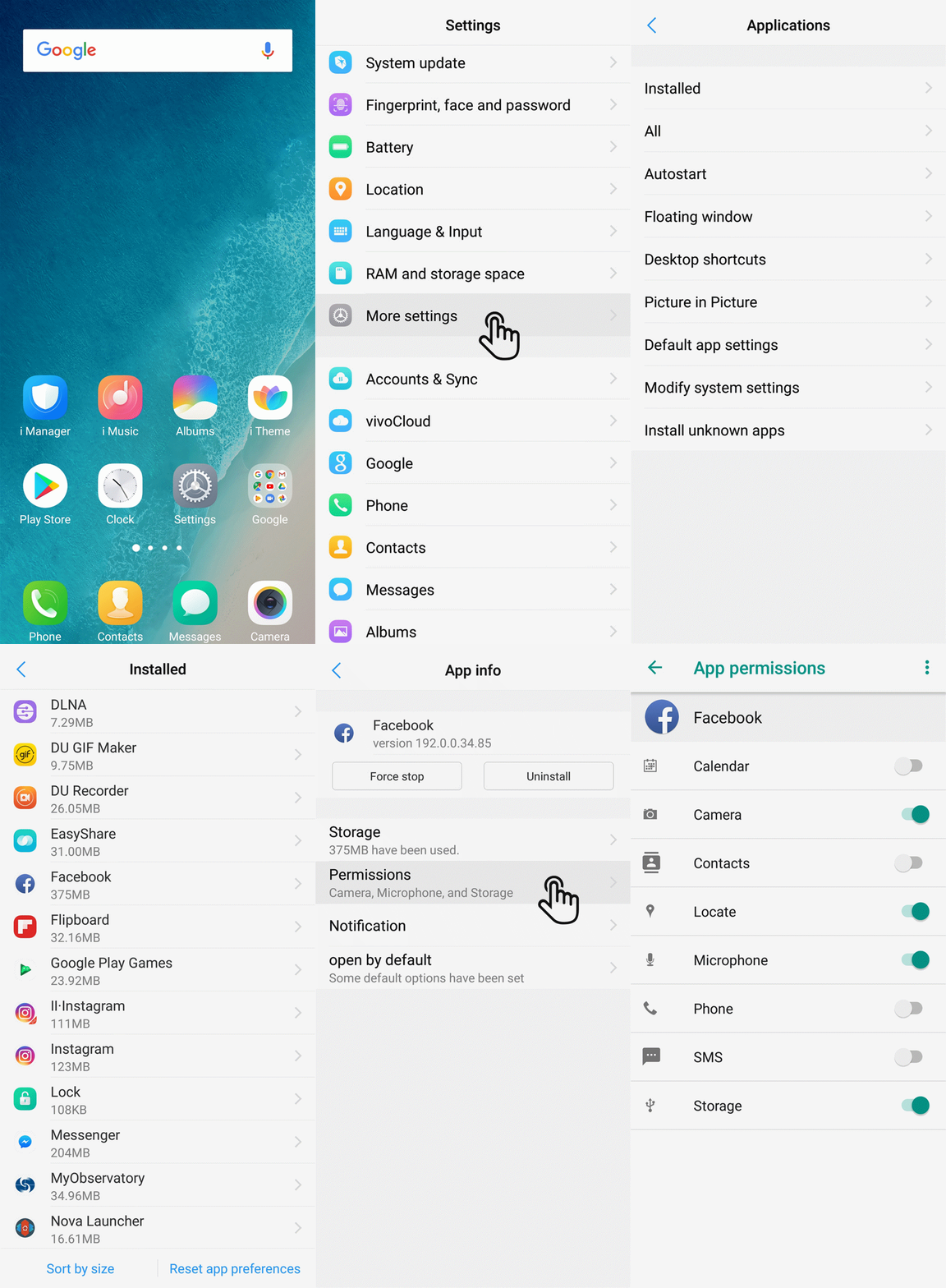
For Funtouch OS 3.0 and higher version, you can go to Settings>More settings>App manager(Applications>Installed)>click the app>Permissions to manage the authority for the apps.
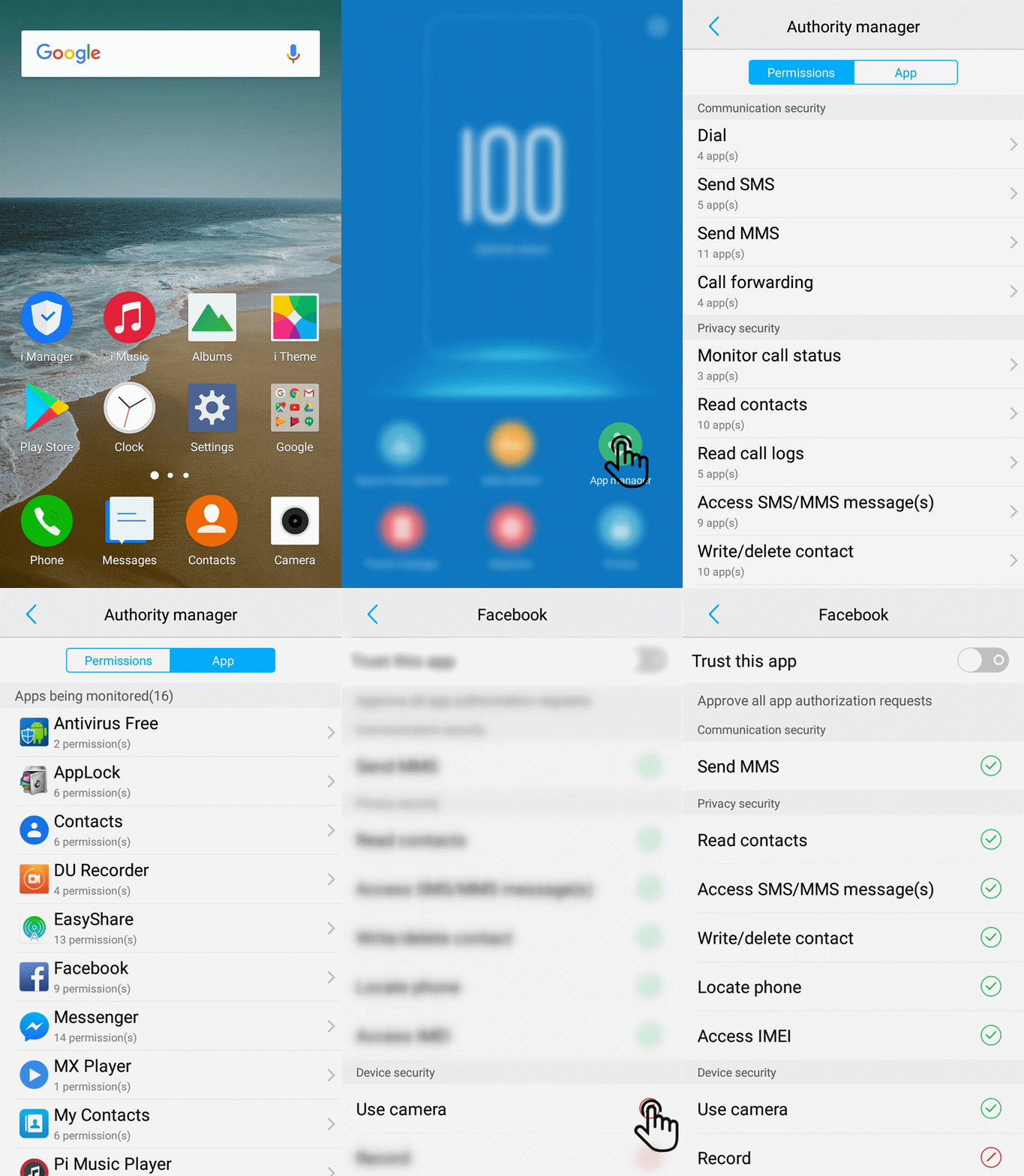
For Funtouch OS 2.5 and lower version, you can enter i Manager>App manager>Authority manager to manage the authority.
Currently, our phones cannot be located through IMEI code. If you cannot locate your phone through Find My Device, we recommend that you can report loss of the SIM card at the operator and change the password of your accounts to avoid more loss.